
We Built an API with AWS Step Functions. Here's Why We Rewrote It.
The promise of visual, self-documenting logic is real. The performance and operational reality is not.
Every growing engineering team eventually runs into the same problem: people come and go. New joiners arrive with questions. Contractors rotate in for a few months and then disappear. Senior engineers get pulled onto other things. And every time someone new touches the codebase, the team pays an onboarding tax in the form of hand-holding, Slack messages, and the kind of “let me just walk you through this” conversations that eat afternoons.
The team I was working with had this problem in spades. The business logic was complex, it lived inside a backend API, and understanding it meant reading through layers of code, tracing execution paths, and hoping whoever wrote the original implementation left comments. Most of the time, they had not.
So we started asking a different question. What if the logic did not need to be explained at all? What if a new joiner could just look at it and understand it?
Enter AWS Step Functions
AWS Step Functions is a serverless orchestration service that lets you model workflows as state machines. You define each step in your process as a state, specify the transitions between them, and AWS renders the whole thing as a visual flowchart in the console. The definition lives in Amazon States Language, which is JSON or YAML under the hood, so it is infrastructure as code. The visual canvas is generated automatically from that definition.
For our onboarding problem, this was genuinely compelling. Instead of asking a new joiner to trace through function calls and conditionals, we could point them at a diagram. The happy path was right there. The branching logic was visible. The error handling was represented as explicit states rather than scattered try-catch blocks. A contractor joining for three months could understand the flow in an afternoon rather than a week.
And the debugging experience was, honestly, great. When an execution failed, the AWS console would show you the state machine diagram with a red square on the exact state that had gone wrong. You could inspect the input and output at each step. You could see precisely where in the flow things had broken down. Compare that to trawling through CloudWatch logs trying to correlate events across services and the Step Functions approach felt like a revelation.
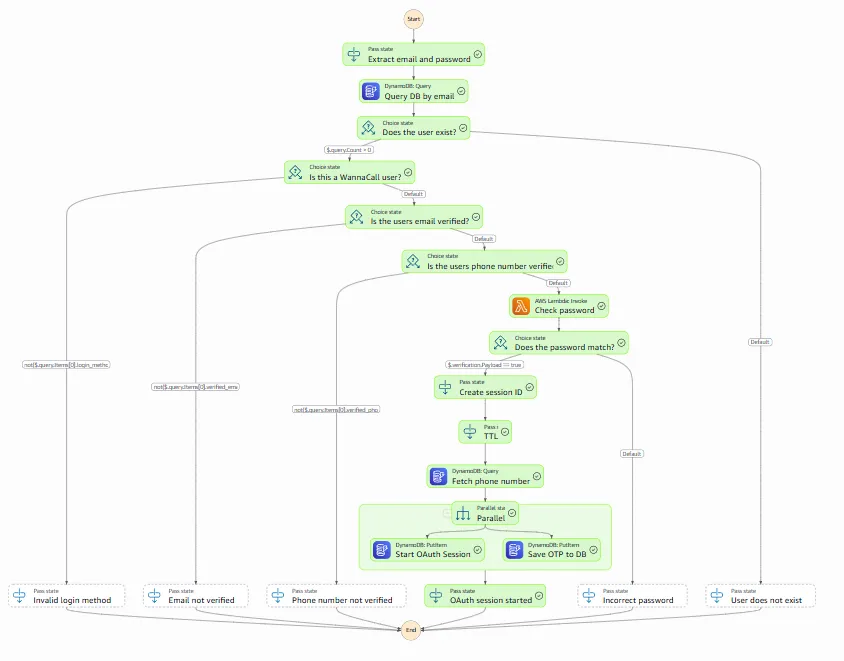
So we built the API on it. And for a while, things looked promising.
The Problem No One Mentions Up Front
Here is the thing about Step Functions: it is an orchestrator. It coordinates work. But it does not execute arbitrary business logic on its own. For anything beyond basic transformations and flow control, you need compute, and in the serverless world that means Lambda.
This is where the architecture starts to get complicated.
The obvious approach is a single Lambda that handles all the business logic for a given flow. But that immediately defeats the purpose of using Step Functions. If all the logic lives in one function, the state machine becomes a thin wrapper with a single state that calls a fat Lambda. The visual diagram tells you almost nothing. You have gained the complexity of Step Functions without any of the readability benefits.
So you do the sensible thing and break the logic into smaller, focused Lambdas. One function per meaningful unit of work. Now the state machine is genuinely expressive. Each state represents something real, the diagram is readable, and a new joiner can follow the flow without diving into code. This is the architecture that makes Step Functions feel worth it.
When the scope is small, the diagram is everything it promises to be.
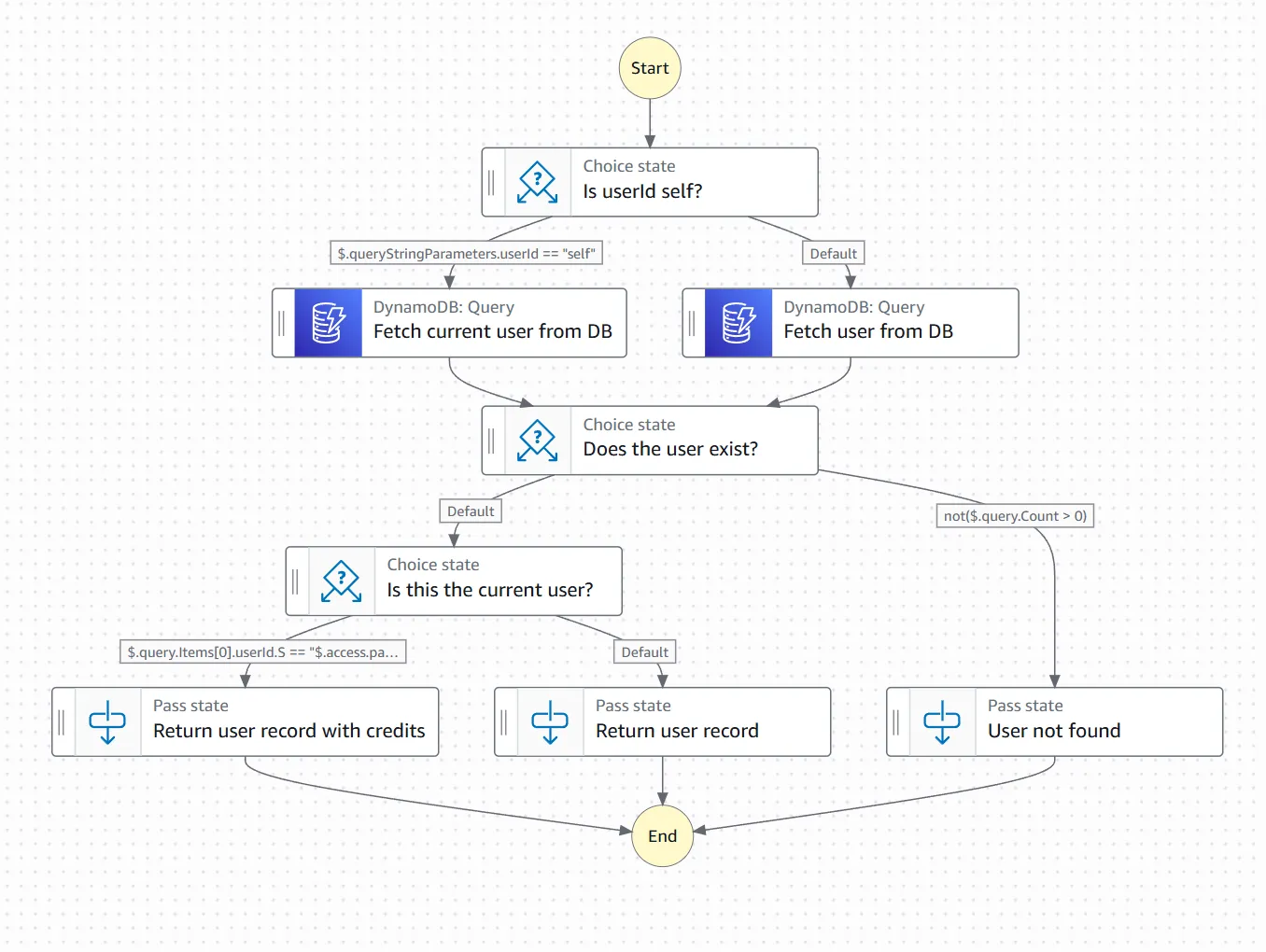
Add a few more conditions and error branches and it is still just about readable.
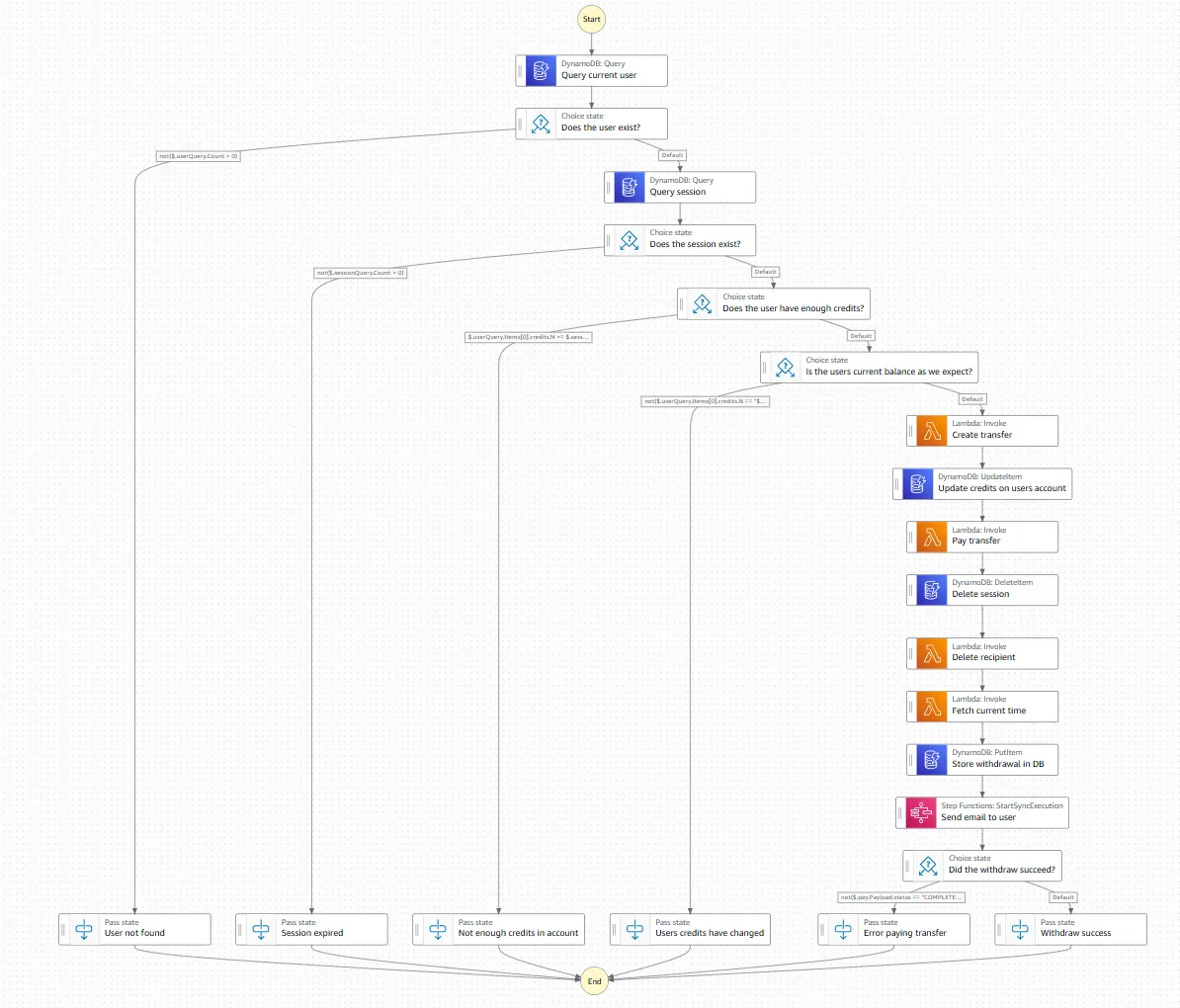
Let the business requirements grow for six months and you end up here.
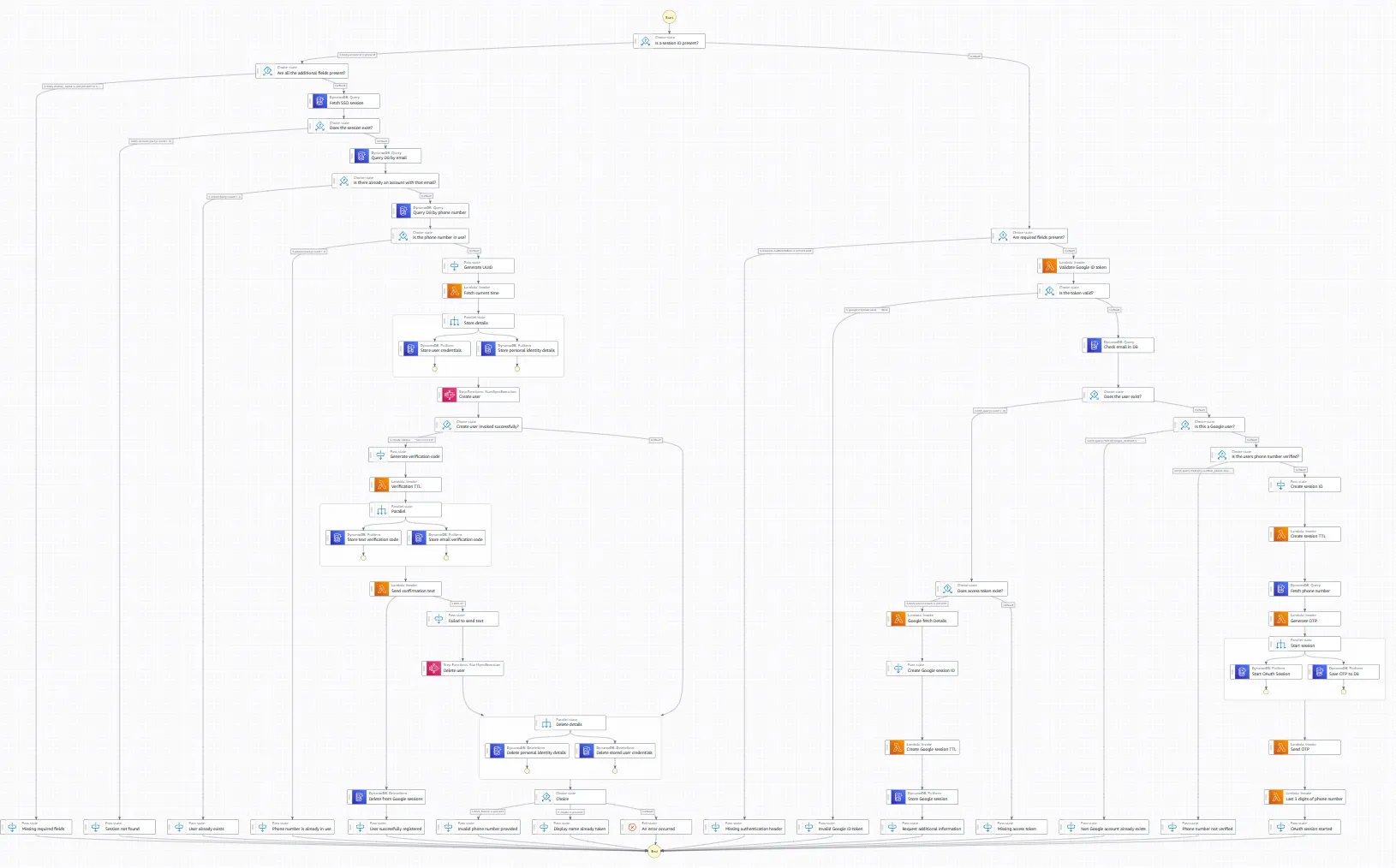
The catch is performance.
Cold Starts Stack Up
Lambda functions have cold starts. When a function has not been invoked recently, AWS needs to initialise the execution environment before it can run your code. Depending on the runtime, the package size, and the VPC configuration, a cold start can add anywhere from a few hundred milliseconds to several seconds to your first invocation.
In isolation, a cold start is annoying but manageable. In a Step Functions workflow made up of six or eight logical Lambdas, they stack. Each state invokes a function. If that function is cold, you wait. Then the next state invokes its function. If that is cold, you wait again. By the time the workflow completes, you have accumulated multiple cold starts in series, each adding its own latency penalty.
For a background job or an asynchronous process, this is tolerable. For a synchronous user-facing API where a person is waiting on a response, it is a serious problem. We were seeing cold start scenarios push total latency into double-digit seconds. Users were staring at loading spinners while a chain of Lambda functions woke themselves up.
Then there was throttling. Lambda has concurrency limits. Under sustained load, functions start getting throttled and Step Functions has to retry. This adds more latency, creates unpredictable behaviour under pressure, and gives you the operational characteristics of a distributed system without giving you the control you would normally have over one.
Getting the API Gateway Integration to Work
Connecting an API to Step Functions is not as straightforward as it sounds. API Gateway and Step Functions do not speak the same language natively. The incoming HTTP request needs to be transformed into an input that Step Functions can start an execution with, and the response needs to be mapped back into something HTTP-shaped.
The way you achieve this integration is through VTL: Velocity Template Language. VTL is a templating language that API Gateway uses to transform requests and responses. You write mapping templates that take the incoming request body, headers, and path parameters and shape them into the format your state machine expects. Then you write another template for the response mapping.
Here is what that looks like in practice. The following is the API Gateway integration block for a typical endpoint — request mapping, credential wiring, URI construction, and response handling, all in VTL embedded inside the OpenAPI YAML definition.
x-amazon-apigateway-integration:
  httpMethod: "POST"
  passthroughBehavior: "when_no_templates"
  type: "aws"
  credentials:
    Fn::Sub: ${ExecuteStateMachineRole.Arn}
  uri:
    Fn::Sub: arn:aws:apigateway:${AWS::Region}:states:action/StartSyncExecution
  requestTemplates:
    application/json:
      Fn::Sub: |-
        #set($headers = {})
        #foreach($header in $input.params().header.keySet())
          #set($headerName = $util.escapeJavaScript($header))
          #set($headerValue = $util.escapeJavaScript($input.params().header.get($header)))
          #if($headerName.trim() && $headerValue.trim())
            $util.qr($headers.put($headerName, $headerValue))
          #end
        #end
        {
          "input":"{\"body\":$util.escapeJavaScript($input.body),\"correlationId\":\"$util.escapeJavaScript($input.params('x-correlation-id').trim())\",#set($headerKeys = $headers.keySet())#set($headerCount = $headerKeys.size())#foreach($headerKey in $headerKeys)\"$headerKey\": \"$util.escapeJavaScript($headers.get($headerKey))\"#if($foreach.hasNext),#end#end}",
          "stateMachineArn": "${MyStateMachine.Arn}:live"
        }
  responses:
    default:
      statusCode: 500
      responseTemplates:
        application/json: |
          #set($response = $util.parseJson($input.body))
          #set($output = $util.parseJson($response.output))
          #if($response.status == "FAILED")
          #set($context.responseOverride.status = 500)
          #elseif($output.httpStatus)
          #set($context.responseOverride.status = $output.httpStatus)
          #else
          #set($context.responseOverride.status = 200)
          #end
          $output.body
In practice this means writing logic in a templating language embedded inside YAML. It is not a real programming language in any meaningful sense. There is no type system, the debugging experience is poor, and the moment your transformation needs to do anything non-trivial you are fighting the tooling every step of the way. Any developer who has not worked with VTL before will need time to get up to speed with it, which starts to erode the onboarding benefits you were trying to achieve in the first place.
The Operational Problems
Beyond the performance and integration issues, the day-to-day operational experience had its own friction points.
Alarms were harder than they should have been. Step Functions executions each get a unique execution ID, and tying a CloudWatch alarm back to a specific state machine run requires you to correlate that ID through your logging. When something breaks in production and you need answers quickly, this extra step is the last thing you want to be dealing with.
Local development was essentially not possible. Step Functions does not run locally. There are community tools that approximate the behaviour, but they are incomplete and unreliable. In practice the team was developing against live AWS environments, which meant every change involved a deployment cycle. The feedback loop was slow, iteration was expensive, and debugging small issues took far longer than it should have.
The infrastructure as code footprint was also significant. Each Lambda needed its own IAM role with appropriate permissions. The state machine definition needed to be maintained separately. The API Gateway integration with its VTL templates needed to be version-controlled and deployed. The whole thing was interconnected in ways that made changes risky and the IaC genuinely complex to reason about.
JSONata: A Glimmer of Hope
AWS introduced JSONata support in Step Functions as a way to handle data transformation directly within state machine definitions, without needing a dedicated Lambda just to reshape some data. JSONata is a proper query and transformation language for JSON and it is a significant improvement over some of the previous workarounds.
We used it. It helped. There were places where we had previously reached for a Lambda purely for transformation purposes and JSONata let us handle that inline. The state machine definitions became cleaner in those areas and the Lambda count came down slightly.
But JSONata does not change the fundamental economics of the architecture. The cold start cascade is still there. The VTL integration is still there. The operational complexity is still there. JSONata makes Step Functions better at what it does. It does not make Step Functions the right tool for a user-facing API.
The Rewrite
After enough production incidents and enough conversations about latency, we made the call to rewrite. We replaced the Step Functions architecture with a single Lambda function. A proper fat Lambda, handling the full API surface, with the business logic organised internally rather than distributed across states and functions.
The results were immediate. Cold start latency dropped from around fifteen seconds in the worst cases to approximately three seconds. With provisioned concurrency, which keeps a set number of Lambda instances initialised and ready to handle requests, we brought that down further still. The unpredictable latency spikes under load disappeared. The alarm setup was trivial. Local development worked normally. The IaC became a fraction of what it had been.
Onboarding did not become effortless overnight, but it returned to being a normal engineering problem rather than a compound one. New joiners had to read code, which is just how it is.
So When Should You Actually Use Step Functions?
There is a legitimate use case for Step Functions and it is worth being clear about what it is. Step Functions excels at workflow orchestration that is not user-facing. Long-running background jobs where the total duration is measured in minutes rather than milliseconds. Complex retry logic for processes that coordinate across multiple services. ETL pipelines, data processing workflows, approval flows, anything where a human is not standing at the other end waiting for an immediate response.
In those contexts, the cold start problem is irrelevant because latency tolerance is high. The visual diagram is genuinely valuable for understanding and debugging complex multi-step processes. The built-in retry and error handling saves real implementation effort. The execution history in the console is useful for auditing and investigation. Step Functions earns its keep there.
The moment a user is waiting on the result of an execution, the trade-offs flip. You are asking a tool designed for asynchronous orchestration to behave like a synchronous API, and it will remind you of that at every opportunity.
Build your APIs with the right tool. Use Step Functions for what it was designed for.
Discussion